How it's made.
A photograph goes in, and comes back rebuilt out of nearly two hundred flower photographs. All of it happens on your machine — there is no upload feature and no application backend to receive the picture. Here is what runs, and why it was built this way.
Step one
Packing the flowers
Before anything can be matched, the palette has to be summarised. A build script reads every flower photograph, centre-crops it to a square, resizes it to 128 px, and packs all 195 into a single sprite atlas — one image holding a 14 × 14 grid, because ⌈√195⌉ = 14.

One image instead of 195 means one HTTP request, one decode, and one texture the renderer can copy from. The whole palette costs 989 KB, cached for a year. Alongside it goes a small JSON file recording each tile's average colour — in RGB, and in CIE LAB.
What is actually wrong with RGB
Two things, and they compound.
The numbers are not proportional to light. A pixel storing 128 is not emitting half the light of one storing 255. sRGB values are gamma-encoded — bent along a curve that spends more of the available precision down in the shadows, where the eye is fussier. Arithmetic on the stored numbers is arithmetic on the wrong quantity, which is exactly what the first three lines of the conversion below undo.
The three channels do not count equally. Human vision is overwhelmingly built for green: about 72% of perceived brightness comes from the green channel, 21% from red, and a mere 7% from blue. Take each primary at full strength and ask how light it actually looks:
| Full-strength primary | Lightness (L*) |
|---|---|
Green — rgb(0,255,0) | 87.7 |
Red — rgb(255,0,0) | 53.2 |
Blue — rgb(0,0,255) | 32.3 |
Identical numbers in the file. Pure green reads nearly three times as bright as pure blue. An equal step in each channel is therefore not an equal change to the eye — so "closest in RGB" means "closest in a space where one axis has been stretched and another squashed".
What LAB is
CIE LAB re-describes the same colours on three axes chosen to match how seeing works:
- L* — lightness, from 0 (black) to 100 (white).
- a* — the green–red axis. Negative is green, positive is red.
- b* — the blue–yellow axis. Negative is blue, positive is yellow.
Those two colour axes are not arbitrary: they mirror the way the visual system actually wires up cone responses — as two opposed pairs, red against green and yellow against blue — which is why there is no such thing as a reddish-green. On those axes, straight-line distance means something. That distance has a name — ΔE — and a rule of thumb: around 2.3 is the smallest difference a person reliably notices with two patches side by side. Ten is obvious. Fifty is a different colour.
It also puts a number on the RGB problem. Take one step of 30 in a single channel and measure what it costs perceptually:
| Same RGB step of 30 | ΔL* | ΔE |
|---|---|---|
| Green, 255 → 225 | 9.4 | 14.3 |
| Blue, 255 → 225 | 4.4 | 12.8 |
| Red, 255 → 225 | 6.2 | 11.3 |
Identical arithmetic, and the green shift lands 27% further from where it started than the red one. The ΔL* column shows where that comes from: the same step in green moves lightness half again as far, because green is carrying most of the brightness. Match in RGB and you tolerate green errors the eye can see, while fussing over blue ones it can barely detect. In a palette that is mostly flowers and foliage, the greens are where that error shows up most.
Caveat LAB is a good approximation, not a perfect one. This is the 1976 formulation, and its successors (CIE94, CIEDE2000) exist precisely because straight-line distance still misbehaves in the deep blues and near-neutrals. For choosing between 195 flowers it is far more than enough, and it is vastly closer to the truth than RGB.
Matched in CIE LAB what the mosaic does
Matched in raw RGB the naive version
That is the real palette, scored with the real distance functions. Drag through the greens and the two rows come apart almost immediately.
// sRGB is gamma-encoded; undo that before any colour maths
const lin = (c) => {
  c /= 255;
  return c <= 0.04045 ? c / 12.92
                       : Math.pow((c + 0.055) / 1.055, 2.4);
};

// linear RGB → XYZ, normalised to the D65 white point
const x = (R*0.4124564 + G*0.3575761 + B*0.1804375) / 0.95047;
const y = (R*0.2126729 + G*0.7151522 + B*0.0721750) / 1.0;
const z = (R*0.0193339 + G*0.1191920 + B*0.9503041) / 1.08883;

// XYZ → LAB, with the cube-root curve that makes distance perceptual
const f = (t) => t > 0.008856 ? Math.cbrt(t) : 7.787*t + 16/116;
return [116*f(y) - 16, 500*(f(x) - f(y)), 200*(f(y) - f(z))];
Those 195 LAB triples are then flattened into a single Float32Array —
labs[i*3], labs[i*3+1], labs[i*3+2] — rather than
an array of little arrays. The inner loop touches all 195 of them for every one of
60,000 cells, and contiguous memory is cheaper to walk than a list of pointers.
Step two
Reading your photograph
Your picture is decoded straight from disk into memory with
createImageBitmap, honouring the orientation flag the camera wrote into
the file's EXIF metadata, so photos taken sideways don't arrive sideways. Then it is shrunk to exactly one pixel per mosaic
cell — a 300-tile-wide mosaic needs a 300-pixel-wide thumbnail. Each of those pixels
is the colour one flower has to match.
Why the shrink happens in stages
Collapsing a 24-megapixel photograph to 300 pixels in a single
drawImage call aliases badly: the browser samples a small neighbourhood and
most of the image never contributes at all. Fine detail becomes noise, and that noise
becomes wrong tile choices — a red jumper reduced to a handful of unlucky samples can
come back grey.
So the image is repeatedly halved until it is within 2× of the target, then drawn once more. Every source pixel gets averaged in on the way down.
while (w > dstW * 2 && h > dstH * 2) {
  const nw = Math.max(dstW, w >> 1);   // halve, never overshoot
  const nh = Math.max(dstH, h >> 1);
  const c = new OffscreenCanvas(nw, nh);
  ctx2d(c).drawImage(cur, 0, 0, nw, nh);
  cur = c; w = nw; h = nh;
}
The same trick scales the flower atlas down to whatever tile size the render is using, so a 128 px flower drawn at 44 px is properly filtered rather than crudely sampled. It halves the whole atlas at once, which at a clean 2:1 ratio keeps sampling tightly local and in practice avoids visible bleed between neighbouring flowers. To be precise, though: the HTML specification does not mandate a particular smoothing algorithm, so this is a pragmatic approximation rather than a guaranteed box filter, and the final non-halving step can in principle sample across a cell edge. Padding each tile with a gutter would make that isolation actual rather than probable.
Step three
Choosing a flower for every cell
For each cell the renderer computes the LAB distance to all 195 flowers and takes the closest few. But closest alone produces a bad picture, for three separate reasons — and each has its own correction.
Problem 1 — a flat sky becomes one flower, repeated
Always picking the nearest match means a large area of near-identical colour gets the identical tile hundreds of times. It stops reading as a mosaic and starts reading as wallpaper.
Correction: take the closest N and pick among them at random. Variation appears without the colour drifting.
Problem 2 — the same flower lands next to itself
Random choice still occasionally puts an identical tile directly beside or above its twin, which the eye catches immediately as a seam.
Correction: the renderer remembers the tile placed to the left and the one placed above, and filters both out of the candidate list — unless that would empty it, in which case a repeat is better than a bad colour.
Problem 3 — a handful of flowers do all the work
Some flowers sit at convenient points in colour space and get chosen constantly, while dozens of others are never used at all.
Correction: every tile has a fair share — total cells divided by 195 — and any tile used beyond it gets a penalty added to its distance, proportional to how far over it has gone. At the default setting on a 60,000-cell render, fair share is about 308 uses and the most-used flower finishes roughly 34 over, which this formula turns into a +68 ΔE penalty. Against a just-noticeable difference of about 2.3, that behaves close to a hard cap past the threshold rather than as a gentle preference. Turn the dial to zero and the maths is pure nearest-colour again.
It is also scan-order dependent. Usage accumulates as the renderer
works top to bottom, so early rows are matched under almost no penalty and later rows
under a growing one. Measured on a default render, the top half draws on 151 distinct
flowers and the bottom half on 180. A penalty scaled to over / fairShare, or
a two-pass allocation, would not lean on reading order like this.
let d = Math.sqrt(dl*dl + da*da + db*db);        // perceptual distance

if (diversity > 0) {                            // spread the work around
  const over = usage[i] - fairShare;
  if (over > 0) d += diversity * over;
}

// keep the best N seen so far, then drop neighbours that would repeat
for (let k = 0; k < filled; k++) {
  const idx = candIdx[k];
  if (idx !== prevCol && idx !== prevRow[col]) pick[np++] = idx;
}
if (np === 0) { /* every option repeats — take the colour hit */ }
Note what isn't there: a sort. Finding the closest five of 195 by sorting would cost 60,000 sorts per render. Instead a fixed five-slot array tracks the worst of the current best, and each candidate is compared against that one number — linear in the number of tiles, with no allocation in the loop at all.
Deterministic
The randomness runs on a seeded generator (mulberry32, 32 bits of state
and four operations), so within the same browser, the same decoded image, settings and
seed reproduce the same arrangement. Across browsers it is not guaranteed: decoding,
colour management and canvas resampling can each shift a cell colour slightly. The
Shuffle slider is that seed, so an arrangement you liked is one you can return
to rather than one you have to hope for.
Step four
Painting sixty thousand tiles
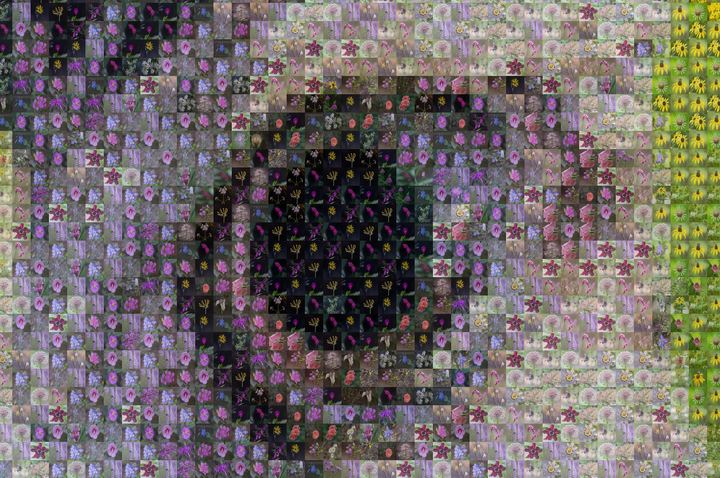
Each chosen flower is copied out of the atlas at its grid position. Then comes the tint — the wash that pulls each flower toward the colour it is standing in for, which is what lets the subject read from across the room.
The obvious way to do that is a per-pixel blend of two images. In Canvas it is one rectangle:
octx.globalAlpha = 1;
octx.drawImage(atlas, sx, sy, cell, cell, dx, dy, tileRes, tileRes);

if (tint > 0) {
  octx.globalAlpha = tint;                        // α·target + (1-α)·flower
  octx.fillStyle = `rgb(${cr},${cg},${cb})`;
  octx.fillRect(dx, dy, tileRes, tileRes);
}
Drawing a solid colour at globalAlpha = t over the flower is
exactly the same arithmetic as blending the two images at ratio
t. Source-over compositing is defined as that straight-line blend —
result = flower + (target − flower) × t — so at a tint of 0.35 every pixel
comes out 35% target colour and 65% flower. The difference is that the
compositor performs it internally — often GPU-accelerated, though that is the browser's
choice — and there is no per-pixel JavaScript anywhere in the hot loop.
All of it runs inside a Web Worker on an
OffscreenCanvas, so the page keeps repainting its progress bar while
60,000 tiles are being placed.
Step five
Where the time actually goes
A default render compares every one of 60,000 cells against all 195 flowers. That is 11.7 million distance calculations, each a subtract-square-add-sqrt in three dimensions — and it is nowhere near the bottleneck. Modern JavaScript engines eat that in a fraction of a second.
What actually costs time, roughly in order:
- Encoding the JPEG. Turning 116 million pixels into a 64 MB file is the single largest slice, and it is native code we simply hand the canvas to.
- 120,000 canvas operations — one
drawImageand onefillRectper tile. - Allocating the canvas at all. The output buffer is 443 MB of RGBA.
- The matching loop, in last place, despite being the part that looks expensive on paper.
Which is why the tint is a fillRect. A per-pixel tint in JavaScript would
have added 116 million read-modify-writes and moved the bottleneck squarely into the
interpreter. Instead the whole render lands in about three and a half seconds.
Step six
Finding out how big it can go
Browsers impose hard ceilings on canvas size, and they differ by more than an order of magnitude between devices. Guessing from the user-agent string is unreliable, so the app measures instead.
- Maximum side length is found by binary search using canvases one pixel tall. Testing whether a 65,535-pixel-wide canvas is allowed costs about 256 KB, not 17 GB.
- Maximum area has to be probed by genuinely allocating, so it climbs a short ladder and stops at the first failure. Crucially, an over-sized canvas often doesn't throw — it silently reads back blank — so each rung writes a pixel into the far corner and reads it back to confirm it took.
Above the ladder, the budget comes from an estimate of about five bytes per output pixel — an empirical figure from measured renders on one machine, not a complete model of browser memory. Real peak use can also include GPU and CPU copies of the same canvas, encoder scratch buffers, readback surfaces and allocator overhead. What was measured:
| What is resident at peak | 116 MP render |
|---|---|
| Output canvas, RGBA | 443 MB |
| Encoded JPEG | 64 MB |
| Preview canvas + downscale intermediates | ~7 MB |
| Peak | ~514 MB |
| Per output pixel | 4.6 bytes |
The app budgets 5.2 rather than 4.6, because being wrong in that direction costs a slightly smaller print and being wrong in the other direction costs the whole render. The adaptive retry below is the more dependable half of this design; the estimate only decides where to start.
Hard-won
An iPhone reported InvalidStateError at settings the probe had approved.
The cause was extrapolating past the ladder using navigator.deviceMemory,
which iOS does not report. A phone that allocates 24 MP happily will still fail
to encode 90 MP. Mobile now trusts only what it measured — and if a render
fails anyway, that failure is treated as the real measurement: the ceiling halves,
settings re-fit, and it tries again.
Step seven
The awkward one: iPhone photos
Photographs from an iPhone are HEIC by default. Safari has decoded them natively since Safari 17; Chrome and Firefox do not.
So the app tries the browser's own decoder first, and only if that fails does it
check the file's magic bytes — the extension is unreliable, since
plenty of HEICs arrive named .jpg. Bytes 4–8 must spell ftyp,
and the four after that must be one of the HEIF brands:
const HEIF_BRANDS = ['heic','heix','heim','heis',
                     'hevc','hevx','hevm','hevs',
                     'mif1','msf1'];
If it really is HEIF, a separate worker loads a WebAssembly build of
libheif, decodes the image, and re-encodes it to JPEG so everything
downstream — the thumbnail, the re-decode at render time — can treat it as an ordinary
file. That re-encode is a deliberate simplification with a real cost: it adds a lossy
generation and discards wide-gamut, HDR and alpha information. Handing the decoded pixels
straight down the pipeline as an ImageBitmap would avoid it; the damage is
invisible here only because the image is about to be reduced to one pixel per mosaic
cell.
The decoder is 1.1 MB and is fetched only at the moment it is needed. Most visitors never download it. Safari users never download it even when opening a HEIC.
Security This is the one place the app parses a hostile-by-default input: an arbitrary file from a stranger, fed to a C library compiled to WebAssembly. Running it in WebAssembly inside a dedicated worker is real containment — memory safety is enforced by the sandbox, and a crash should take the worker rather than the tab — but it does not make parser bugs disappear. The pinned build is libheif-js 1.19.8, which is the newest published on npm; the JavaScript wrapper lags the upstream C library, so this is not necessarily current with upstream security fixes. Treat updating it as maintenance, not a one-off.
Step eight
What stays on your machine
Your photograph is decoded, matched and drawn locally. The application has no image-upload feature and no application backend that receives it, and there is no code path here that sends it anywhere.
What the site does have is a CDN — a content delivery network, the ordinary fleet of machines that keeps copies of a site's files close to whoever asks for them. Like any website, it records the requests it serves: addresses, timestamps, which files were fetched. Your picture is not among them, but it is not the case that there is no server at all.
There is also a Content-Security-Policy, or CSP: a set of rules the site hands to the browser saying what this page is allowed to do — where it may load code from, and who it may talk to. The browser, not the site, is the one that enforces them. Ours reads:
Content-Security-Policy:
  default-src 'self'; script-src 'self' 'wasm-unsafe-eval';
  img-src 'self' blob: data:; worker-src 'self' blob:;
  connect-src 'self';              ← connections limited to this site
  form-action 'none'; base-uri 'none'; frame-ancestors 'none';
Be careful about what that proves, though. connect-src 'self' blocks
connections to other origins; it does not forbid connections
altogether. Same-origin fetch, beacons and image requests all remain
available, and anything encoded into a same-origin URL would land in ordinary CDN logs.
CSP constrains where data could go; it does not prove that none does.
The claim is therefore a layered one. The architecture is the substance: no upload feature, no application backend, no database, no storage bucket, no compute. The CSP is a guardrail on top of it. And because it is all static files you can read, the claim is checkable — open the network panel and watch what a render actually does.
Finally
Four things that went wrong
The tidy version above is not how any of it went. Four of the detours were worth keeping.
Lazy loading that never loaded
The gallery below the fold used loading="lazy". The images simply never
appeared — fully inside the viewport, page load complete, and absent from
the network panel entirely. Chrome does not reliably fire lazy-loading for images
inside certain layout containers — multi-column, which is what that gallery is, and
grid, which is what the pair of hawks further up this page sits in. Both were caught
the same way: in the viewport, and absent from the resource timing list
entirely. Which cards broke varied between reloads, so it first looked like one
corrupt file rather than a layout-wide fault. The fix, both times, was deleting the
attribute.
A CSP directive that silently disabled HEIC
WebAssembly needs 'wasm-unsafe-eval' in script-src. Without
it Chrome refuses to compile the module and HEIC support is simply absent, with no error
surfaced to the page. The policy had been tested against JPEGs, which never touch that
path.
Automatic crop-finding that found the worst crops
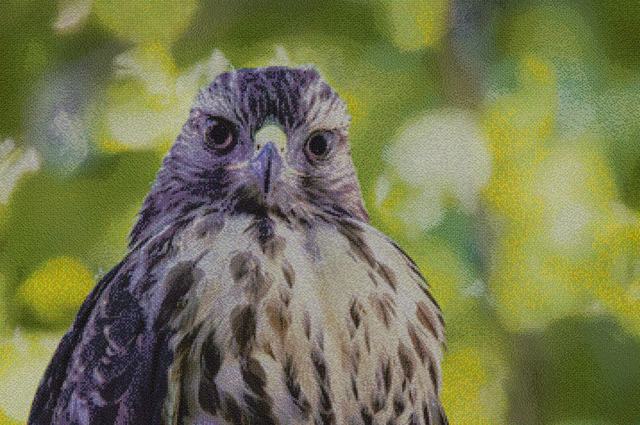
The gallery's close-up crops were briefly chosen by an algorithm hunting for maximum local contrast. It reliably picked the boundary between a dark wing and a bright sky — technically the highest-contrast region on the image, and visually two flat fields meeting in a line. What actually reads is a recognisable feature built from flowers: an eye, a beak. Those crops are now placed by hand.
Two good ideas that ruined each other
The headline on the front page is filled with flower photographs. The background is scattered with flower photographs. Overlap them and both disappear into texture. The fix was not a cleverer blend mode but ordinary layout: move the words into clear space. Two attempts to rescue it with drop-shadows and a darkened scrim each made it worse.